
Download TopPlay – IPTV Player, Video, Android, Free
Overview
TopPlay - IPTV Player is a free desktop application designed for Android users seeking a dedicated tool for streaming live television content. Developed by 비트로그 BITLOG, the software falls within the 'Video' category and is intended to serve as a straightforward IPTV player for Android devices. Its primary function is to enable users to access and view live TV channels through IPTV streams, offering a streamlined experience for those who rely on digital television services.
The application targets casual and tech-savvy users who prefer direct access to live content without the need for complex setups. It is particularly useful for individuals who use IPTV subscriptions or public streams and want a simple, reliable way to view them on their mobile devices. While the developer did not provide detailed background information beyond the name, the software’s release on November 9th, 2023, marks it as a relatively recent entry in the Android video player space.
TopPlay is designed for on-the-go viewing, making it suitable for users who want to watch live sports, news, or entertainment channels while traveling or away from a traditional TV setup. The absence of a desktop version in the provided details limits its use to mobile platforms, but its lightweight nature and focus on core functionality suggest it is built for efficiency and ease of access.
Key Features & Capabilities
- IPTV Stream Support – TopPlay is built to play live IPTV streams, allowing users to access a wide range of television channels through URL-based playlists.
- Lightweight Design – With a file size of 12.4 MB, the application is optimized for devices with limited storage, ensuring quick installation and minimal system impact.
- Multi-Language Interface – The software supports both English and Korean, broadening its accessibility for international users.
- Simple Playback Controls – Users can easily navigate between channels, adjust volume, and manage playback with intuitive on-screen controls.
- Android 13.0+ Compatibility – The app is designed to run on modern Android devices, ensuring access to updated system features and improved security.
These features make TopPlay ideal for users who need a no-frills IPTV player. For example, a user with an IPTV subscription can input their playlist URL directly into the app and begin watching live channels instantly. Similarly, someone exploring free public streams can use the app to test and view content without installing multiple players. The minimal interface reduces learning curves, allowing even non-technical users to get started quickly.
User Interface, Workflow & Performance
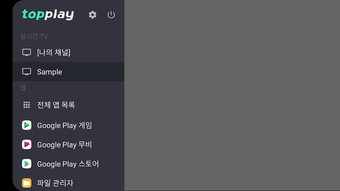
TopPlay features a clean, minimal user interface focused on core playback functionality. The layout emphasizes channel listing and playback controls, reducing visual clutter. Navigation is straightforward, with channels displayed in a list or grid format, depending on the device’s screen size and orientation. Users can access settings through a menu, where they can manage playlists, adjust playback preferences, and switch between languages.
Workflow efficiency is a key strength, as the app allows users to load and start streaming with minimal steps. After entering an M3U playlist URL, the app typically begins playback immediately, with minimal buffering or delay. However, actual performance may vary based on network stability and the quality of the stream source.
The developer did not specify resource usage details. Performance observations are based on general software behavior patterns. The app is expected to run efficiently on devices meeting the minimum Android 13.0 requirement. Stability appears to be a priority, given the app’s focus on a single core function. No reports of crashes or freezes were provided in the input data.
Compatibility & System Requirements
TopPlay is designed for Android operating systems, specifically requiring Android 13.0 or higher. This ensures compatibility with modern smartphones and tablets that support updated security protocols and hardware acceleration for video decoding. The application is available as a downloadable APK file, with a file size of 12.4 MB, making it suitable for devices with limited storage capacity.
Exact system requirements were not listed. The developer did not provide details about RAM, CPU, or GPU specifications. Installation is straightforward, typically involving enabling unknown sources in device settings and installing the APK. No additional software dependencies are mentioned.
Compatibility information was partially provided. While the app is confirmed to work on Android 13.0 and above, support for older versions is not guaranteed. Users of Android 12 or earlier should expect potential incompatibility or functionality issues.
Pros and Cons
Pros
- Free to download and use with no hidden costs
- Lightweight file size (12.4 MB) ideal for low-storage devices
- Supports both English and Korean language interfaces
- Designed for fast setup and immediate playback
- Runs on Android 13.0 and above, ensuring modern security standards
Cons
- No desktop or PC version available
- Compatibility limited to Android 13.0 and newer devices
- Developer did not provide detailed system requirements
- Performance details such as CPU or RAM usage were not specified
- Availability limited to Android platform; no support for iOS or other systems
FAQ Section
Is TopPlay available for Windows or Mac?
Currently, TopPlay is only available for Android devices. There is no desktop version for Windows or Mac.
Is TopPlay safe to download and use?
TopPlay is a free app published on Softonic. While the source is reputable, users should ensure they download from official or trusted sources to avoid modified or malicious versions.
Does TopPlay require an internet connection?
Yes, TopPlay requires a stable internet connection to stream live IPTV content. It cannot play local files or offline content.
How often is TopPlay updated?
The latest version is 1.0.7, released on November 9th, 2023. No information about update frequency was provided.
Can I use TopPlay with any IPTV service?
TopPlay supports IPTV streams via M3U playlists. Users can connect to any service that provides a valid playlist URL, though compatibility depends on the stream source and network conditions.
Final Thoughts
TopPlay - IPTV Player delivers a focused, lightweight solution for Android users who want to stream live television content. Its simple interface, minimal system demands, and support for multiple languages make it accessible to a broad audience. While it lacks a desktop version and has limited compatibility with older Android devices, its strengths lie in ease of use and direct functionality.
For individuals relying on IPTV subscriptions or public streams, TopPlay offers a reliable and efficient way to watch live content on mobile. The free license removes financial barriers, and the app’s design prioritizes speed and simplicity. Although detailed performance data and system requirements are not available, the app’s lightweight nature and modern Android support suggest it is built for stability and efficiency.
Download TopPlay now and start streaming live TV on your Android device today.






.png)
